

In the carousel you saw 5 faceless video niches that are growing right now, and nobody shows their face in any of them. Here’s what I promised: the style prompt for each one, 3 copy-paste scene prompts, the motion prompt and the step-by-step to get your first video out.
The example images in this guide were made with these exact prompts (Nano Banana Pro, 9:16 format).
Note
Who does what. The image for each scene comes from Nano Banana (in Gemini, Google Flow or kie.ai). The motion comes from an image-to-video model: Veo in Google Flow, or Kling. The voice comes from ElevenLabs or from Flow itself. The edit, in CapCut.
From idea to faceless video
Pick a niche
And don’t change it for your first 5 videos.
Lock the style
Paste the style prompt in front of every scene.
Short script
5-8 scenes, one line per scene, hook in the first second.
Images in Nano Banana
Style + scene, 9:16 and always NO TEXT.
Motion in Veo or Kling
5-8 seconds per image with the motion prompt.
Voice, sound and edit
Voiceover, sound effects and big captions in CapCut.
The 5 faceless niches at a glance
| # | Niche | Style | Reference account | Followers | Most-viewed reel |
|---|---|---|---|---|---|
| 1 | Dramatized history | Realistic oil painting, slow motion | @null.histories | 995K | 178K |
| 2 | Wolf fables | Cartoon noir, psychology quotes | @quietwolfzz | 1.3M | 10.3M |
| 3 | Stretchy couple | Claymation-style 3D, no-dialogue gags | @mr._stretchy | 1.3M | 27M |
| 4 | Cube slicing | Satisfying 3D, “0 cuts vs 1,000” | @infiniteslice01 | 73K | 45.2M |
| 5 | First-person “what if…?” | Realistic POV, absurd science | @realityrendered__ | 72K | 1.5M |
Instagram data checked on November 8, 2026; the “most-viewed reel” is the peak among each account’s ~30 latest posts. Accounts are cited only as format references.
Step by step (works for all 5 niches)
- Pick ONE niche and don’t change it for 5 videos. What grows these accounts is repetition: same character, same shot, same structure.
- Lock the style: copy the niche’s style prompt and always paste it in front of every scene. If there’s a recurring character (niches 2 and 3), generate their character sheet first and pass it as a reference image in every scene.
- Short script: 5-8 scenes, one line per scene. The strongest line goes first: that’s your hook.
- Images: generate each scene with the style prompt + the scene prompt, in 9:16 format. The style prompt already includes “NO TEXT” so the AI doesn’t add weird lettering.
- Motion: animate each image for 5-8 seconds with Veo (in Google Flow) or Kling, using the niche’s motion prompt.
- Voice and sound: voiceover (ElevenLabs or Flow’s voice) and sound effects. In niches 3 and 4, the ASMR sound is half the video.
- Edit in CapCut: a cut on every line, big captions and 15-40 seconds total. Post and repeat.
How much it costs: free route vs paid route
| Route | Image | Video | Cost |
|---|---|---|---|
| Free | Nano Banana in Google Flow or Gemini | Veo 3.1 in Google Flow | $0: 50 credits a day (Lite = 10 per video, Fast = 20) |
| Cheap paid | nano-banana-pro on kie.ai | Kling 3.0 std on kie.ai | ≈ $0.07 per second of video (a 5 s clip ≈ $0.35) |
With Google Flow’s 50 daily credits you get about 5 clips with Veo 3.1 Lite or 2 with Veo 3.1 Fast a day: enough to get your first test video out in a day or two. Credits don’t roll over to the next day, and at peak times Flow may not let you generate video without a subscription (images still work). Source: Google Flow’s credits help page.
Tip
The Claude shortcut. Paste your niche’s style prompt into Claude and ask: “Write me a 6-scene script about [YOUR TOPIC] and, for each scene, the scene prompt in English in the same format as these examples.” You get the whole video back, ready to generate.
1. Dramatized history (realistic oil painting)
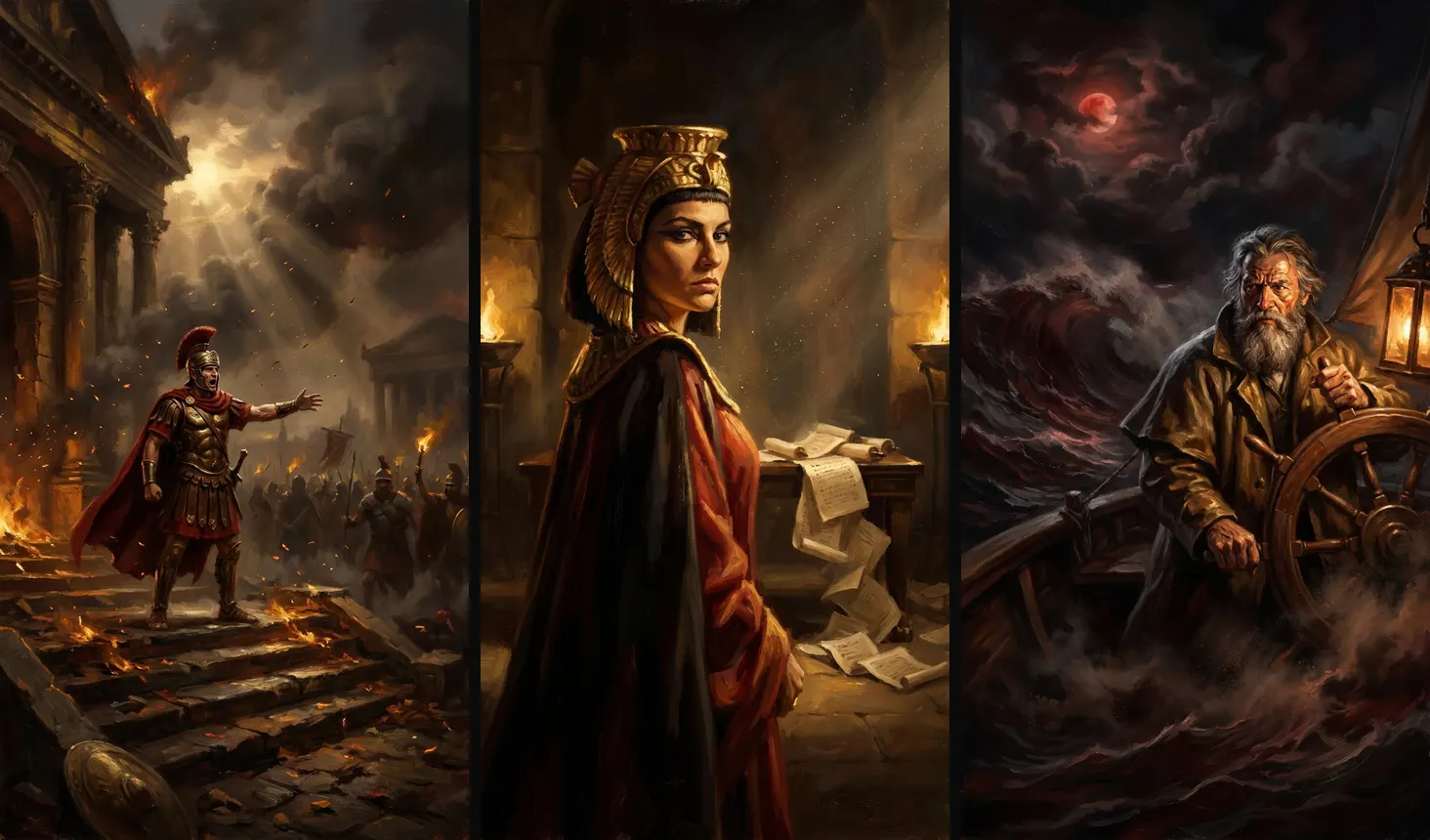
How it works: a real moment in history told in the first person by the person who lived it. 6-8 scenes of 5 seconds, one line per scene, a deep slow voice, and an ending with a twist (“and nobody saw it coming”).
Vertical 9:16 frame, a single still from a short-form AI video. NO TEXT, no letters, no captions, no subtitles, no logos, no watermarks, no UI, no borders.
STYLE: dramatic realistic oil painting, visible thick brushstrokes, Rembrandt chiaroscuro lighting, cinematic slow-motion feel, rich palette of deep umber #3b2414, burnt gold #c8902e, crimson #8e1b1b and smoky black #0d0b0a, volumetric god rays and drifting dust, museum-quality historical painting, original characters (not real portraits).a Roman general in a crimson cloak and bronze armor stands alone on the steps of a burning senate building at dusk, shouting a defiant order, embers floating in the air, crowd of soldiers blurred in the background, low camera angle.an Egyptian queen with a gold headdress turns her head toward the viewer inside a torch-lit throne hall, expression of cold fury, papyrus scrolls falling from a table, golden light from braziers, close-up medium shot.a 15th-century sailor with a grey beard grips the wheel of a wooden caravel during a violent storm at night, a blood-red moon breaking through the clouds, huge waves, lantern light on his face.Slow cinematic push-in, dust and embers drifting, the character turns slowly toward the camera and speaks with a deep voice, oil painting texture preserved, 5 seconds.2. Wolf fables (cartoon noir)
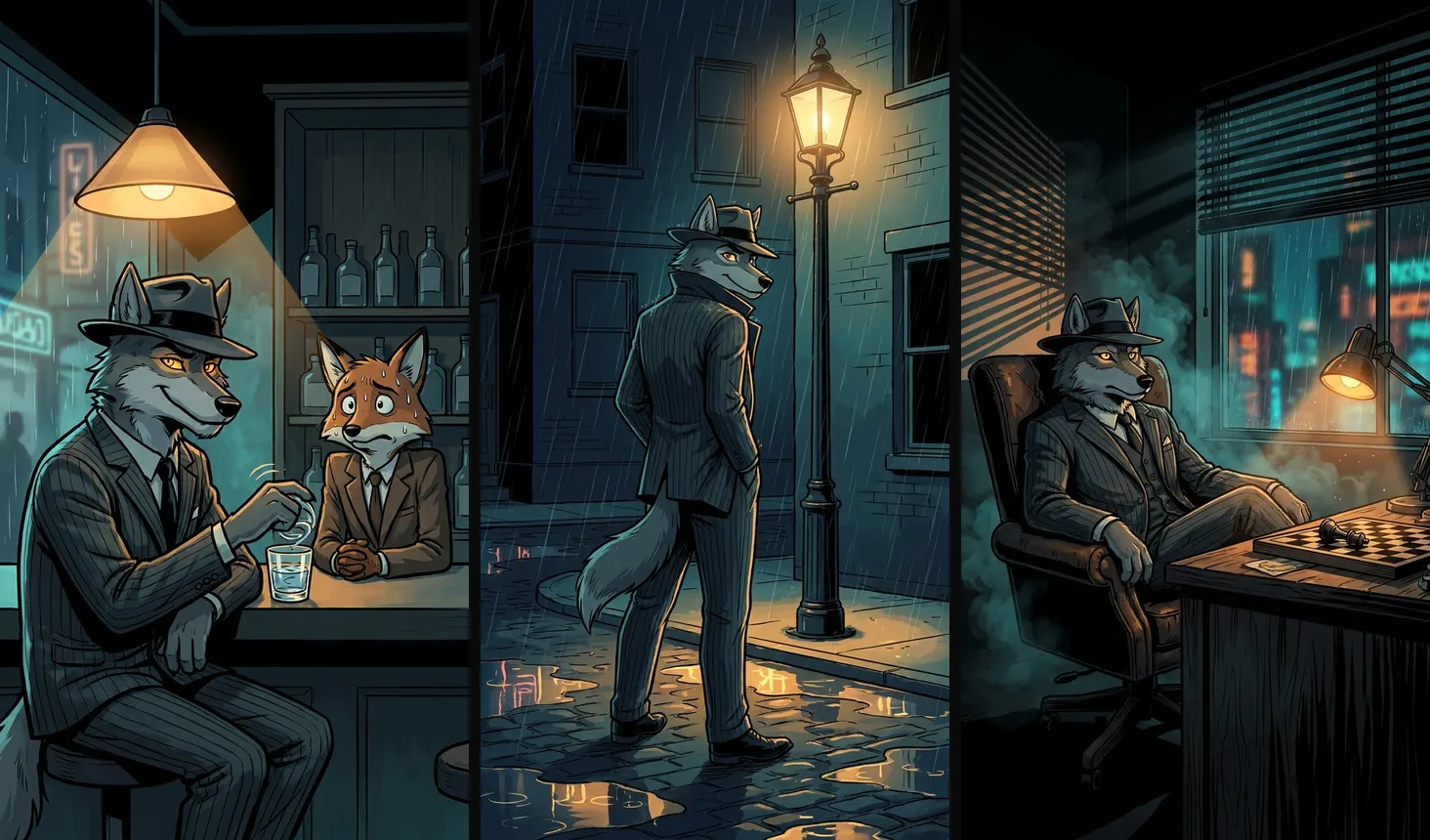
How it works: first generate the wolf’s character sheet (front, profile, 3/4 and 4 expressions) and use it as a reference in every scene. Each video is a psychology lesson (for example, “the one who talks the most knows the least”) in 3-5 scenes.
Vertical 9:16 frame, a single still from a short-form AI video. NO TEXT, no letters, no captions, no subtitles, no logos, no watermarks, no UI, no borders.
STYLE: cartoon noir illustration, bold clean ink outlines, cel shading, moody 1940s detective comic look, original anthropomorphic grey wolf character with amber eyes wearing a charcoal pinstripe suit and fedora, palette of midnight blue #101a2b, smoky teal #2f4f5a, warm lamplight amber #e3a03a and black #050505, rain and neon reflections, cinematic composition.the wolf sits calmly at a bar counter at night swirling a glass of water, a nervous cartoon fox in a cheap suit next to him sweating, the wolf giving a knowing half-smile, warm lamp above. Behind them only a plain dark wooden wall and bottles without labels: no windows with signs, no neon lettering, no writing anywhere.the wolf stands alone under a street lamp in the rain at night, collar up, looking over his shoulder at the viewer with a calm confident expression, puddles reflecting the lamp light. Plain brick walls and blank unlit windows only: no shop signs, no neon lettering, no writing anywhere.the wolf leans back in a leather chair in a dark office, hands steepled, a chess board with one piece knocked over on the desk, venetian blind shadows across the room.Subtle noir animation, rain falling, lamp flicker, the wolf slowly raises his eyes and smirks, smoke drifting, comic-book shading preserved, 5 seconds.3. Stretchy couple (claymation-style 3D)
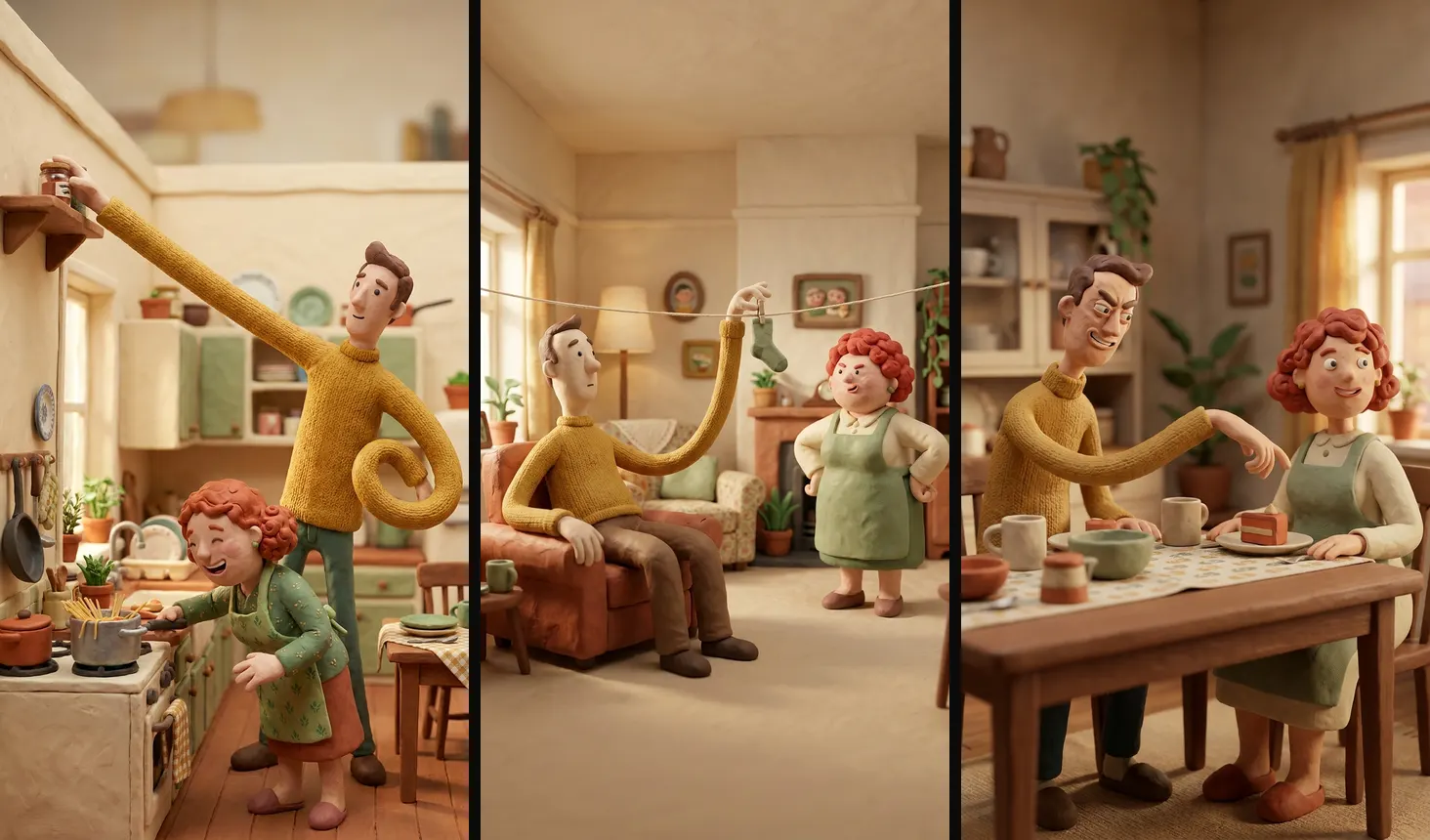
How it works: lock the 2 characters with a character sheet each. One gag per video (8-10 seconds) and no dialogue: sound rules (rubbery stretches, plates, laughs). The gag has to land even with the sound off.
Vertical 9:16 frame, a single still from a short-form AI video. NO TEXT, no letters, no captions, no subtitles, no logos, no watermarks, no UI, no borders.
STYLE: 3D stop-motion clay animation look, plasticine characters with fingerprints and soft subsurface skin, Aardman / Pixar-like charm, two original characters: a lanky man with extremely long rubbery stretchy arms in a mustard sweater and a cheerful short woman with curly red hair and a green apron, cozy domestic set, warm soft key light, palette of cream #f3e6cf, mustard #d9a32b, sage green #8fae7b and terracotta #c4623a, shallow depth of field.in a small kitchen the man stretches his arm across the whole room to grab a jar from the top shelf while the woman cooks spaghetti and laughs, comedic gag moment, eye-level shot.in a living room the man uses his super long stretched arms to hang laundry on a line from the sofa without getting up, the woman with hands on hips looking at him annoyed but amused.at a dining table the man's stretchy arm sneaks across the table to steal a slice of cake from the woman's plate while she is looking away, close comedic framing.Stop-motion clay animation at 12 fps feel, the man's arm stretches like rubber across the room in one smooth comedic motion, the woman reacts with a surprised laugh, 8 seconds, no dialogue.4. Cube slicing (satisfying 3D)
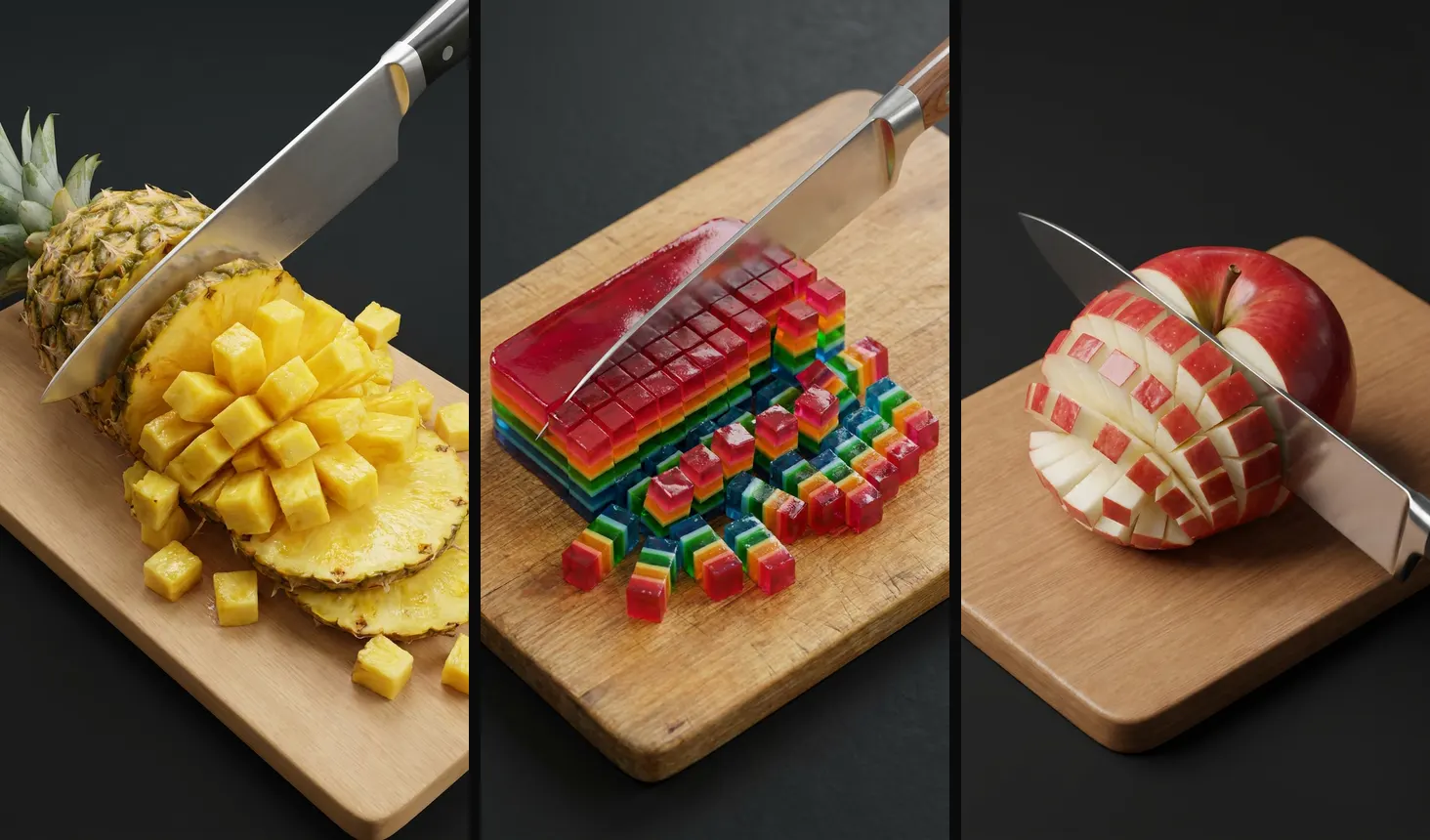
How it works: the same shot and the same board in every video (it’s the channel’s signature). Structure: 0 cuts → 10 → 100 → 1,000, with a big on-screen counter you add yourself in the edit. An ASMR cutting sound on every hit.
Vertical 9:16 frame, a single still from a short-form AI video. NO TEXT, no letters, no captions, no subtitles, no logos, no watermarks, no UI, no borders.
STYLE: hyper-satisfying 3D render, clean studio lighting, glossy physically based materials, objects sliced into perfect tiny cubes, oddly satisfying ASMR aesthetic, plain wooden cutting board on a dark charcoal #1a1a1a background, crisp macro detail, juicy cross-sections, top-down three-quarter angle, same camera framing in every shot.a large chef knife slicing a whole pineapple, the pineapple splitting into hundreds of perfect yellow #f2c230 juicy cubes that cascade on the board.a knife cutting a block of colorful layered jelly cake into tiny perfect cubes, translucent layers of red #e23b3b, orange, green and blue glowing in the light, cubes tumbling.a knife slicing a big glossy red apple into a perfect grid of tiny cubes, white flesh visible, the apple holding its shape for a moment before collapsing into cubes.Satisfying slow-motion cut, the knife glides down and the object separates into perfect tiny cubes that tumble softly on the board, crisp ASMR feel, locked camera, 6 seconds.5. First-person “what if…?” (realistic POV)
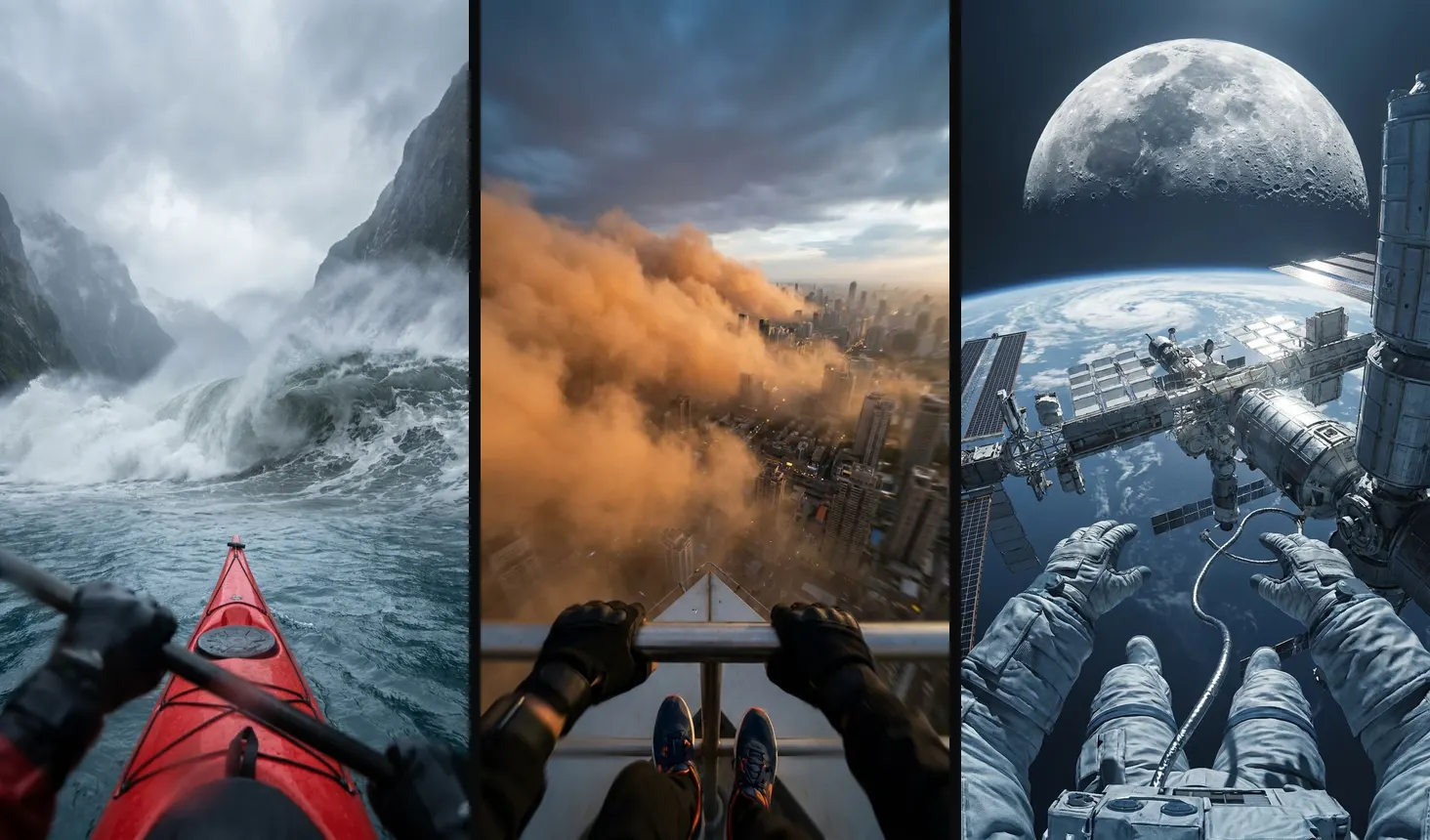
How it works: open with the question on screen (“What if you were in a kayak when a megatsunami hit?”). 4-6 POV scenes of 6-8 seconds that keep escalating; the last one is the wildest. A calm voiceover, in contrast with the visuals.
Vertical 9:16 frame, a single still from a short-form AI video. NO TEXT, no letters, no captions, no subtitles, no logos, no watermarks, no UI, no borders.
STYLE: photorealistic first-person POV shot, as if filmed with a wide action camera, the viewer's own hands visible at the bottom of the frame, epic scale, cinematic realism, natural lighting, slight motion blur, Unreal Engine 5 realism, palette of steel blue #3b5a78, glacier white #e8eef2 and storm grey #5a5f66.POV in a small red kayak paddling in a narrow fjord, the viewer's hands holding the paddle, a colossal tsunami wave rising between the mountains ahead, spray in the air.POV standing on top of a skyscraper roof edge at sunset, the viewer's sneakers visible, the city below being swallowed by a gigantic sandstorm wall rolling in, orange dust #c9743a.POV floating in a spacesuit outside a space station, the viewer's gloved hands reaching toward a tether, Earth below and the Moon appearing enormous, unrealistically close, filling half the sky.First-person POV, handheld camera shake, the viewer's hands react as the giant event approaches, wind and spray hitting the lens, realistic physics, 6-8 seconds.Mistakes that sink a faceless niche
- Changing style every video. The algorithm and your audience need to recognize you in one second. Same style prompt, always.
- Letting the AI write in the image. You get warped text. Ask for “NO TEXT” and add captions in the edit.
- Clips that are too long. Past 8 seconds the character starts to deform. Better to use more short scenes.
- A different character in every scene. In niches 2 and 3, the character sheet as a reference is a must.
- Copying the reference account. Use it to understand the format, not to clone its videos. Your topic, your character and your voice.
Note
Heads-up. YouTube and Meta penalize repetitive mass-produced content. We don’t promise virality or monetization: these are a base for you to make something of your own.
Tip
Want it without editing anything by hand? My Fábrica de Reels pack builds the whole reel with Claude Code: script, voice, animation and captions. It’s optional: everything in this guide works without it.