
Pack★ Featured

Reel Factory
Ask Claude for a reel and get it back finished: script, your voice, animation, captions, sound effects and music. 11 styles.
$69
one-time payment


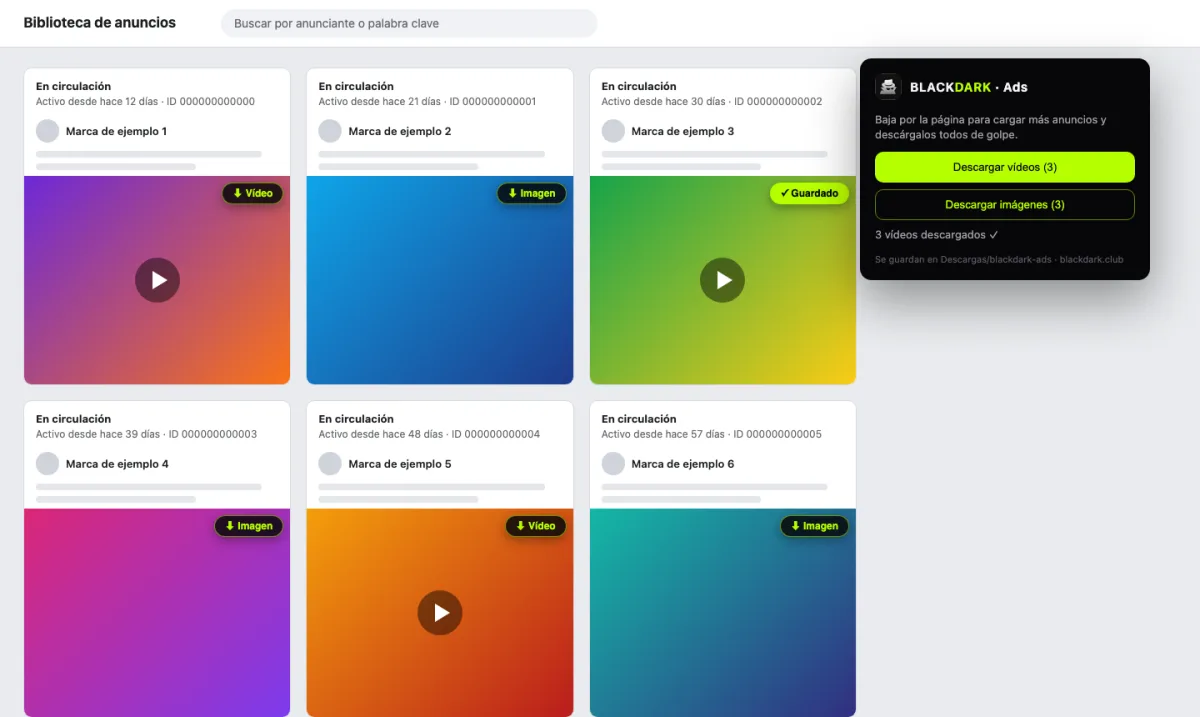
A Chrome extension that puts a “⬇ Vídeo” or “⬇ Imagen” button on top of every ad in Meta's Ad Library. From its icon, you can download every loaded ad at once. Great for saving references of ads that work.
⚠ Read this first
Free
Free. The extension needs no accounts or keys and sends no data. We email it to you (20 KB ZIP).
You get a “blackdark-extension” folder. Keep it somewhere safe: Chrome uses it.
Type this in the address bar and press Enter.
chrome://extensionsIt's the switch at the top right.
Pick the “blackdark-extension” folder. The spy icon will appear in your extensions (pin it to keep it handy).
Open facebook.com/ads/library and search for a brand. Every ad gets its ⬇ button. To grab them all, scroll down and click the extension icon.
https://www.facebook.com/ads/library/Nothing. It's free and uses no paid service.
In your Downloads folder, inside “blackdark-ads”, with the ad ID in the file name (e.g. 1234567890-video.mp4).
For now we share it as a downloadable project, so it installs in “developer mode”. The code is right there in the ZIP.
It only has permission to download files and read the Ad Library page. No sign-in, it doesn't read your other tabs and sends no data anywhere.
No. Only Chrome and Chrome-based browsers (Brave, Edge, Arc).
Wait for the video or image to load, or reload the page. If Meta changes its site it may stop working until we update it.
Ask Claude for a reel and get it back finished: script, your voice, animation, captions, sound effects and music. 11 styles.
$69
one-time payment
An X-ray of any public account's reels: which hook works, which ones blew up and its top 10.
Free
+ Apify usage on your account
